FinOps platform
The FinOps platform that drives action, not just visibility.
Track cloud costs, identify savings and assign actions across AWS and Azure. Emnode is FinOps software built for engineering, finance and operations teams, without enterprise complexity.
Read-only access · Connect AWS or Azure in minutes · No card needed until the trial ends
Setup
Takes minutes
A guided, read-only connection — nothing to install.
Price
From £79/mo
Unlimited users and cloud accounts.
Access
Read-only
No changes to your infrastructure.
Free trial
14 days
No card needed until it ends.
The problem
Cost visibility is easy. Making savings happen is the hard part.
Most teams already have dashboards and spreadsheets. What they lack is the process around them: someone accountable for each saving, and a regular slot in the calendar where the list actually gets worked through.
Finance and engineering speak different languages. One sees budget variance; the other sees instance types. Nothing connects them.
Spreadsheet FinOps doesn't scale. Manual exports, stale data and no audit trail of what was actioned.
Recommendations without owners die. Savings are identified, discussed and then forgotten by the next sprint.
Cost Explorer and Azure Cost Management aren't enough. The native tools show you what you spent. They don't put a name against it, track whether it got fixed, or tell you whether the saving landed.
Without a FinOps hire
Nobody here does FinOps full time. That's the normal case.
A FinOps practitioner spends their week on three jobs: finding the waste, chasing the people who can fix it, and checking afterwards whether the bill actually moved. Emnode does those three on a schedule, so they still happen when nobody owns them.
Finding it
Both clouds scanned every day, every opportunity priced against your own bill and ranked by monthly value. Nobody has to go looking.
Chasing it
Each opportunity carries an owner and an age. Anything sitting too long is visible on its own, without someone having to ask around.
Proving it
Emnode watches the daily billing data after each change and reports what actually landed.
What you can cut
Every opportunity priced, before the debate starts.
Spend, anomalies and savings opportunities on one dashboard across AWS and Azure, with waste grouped by type and the monthly saving against each — so a FinOps review opens with a ranked list rather than an argument about where to look first.
From found to proved
A saving isn't real until it shows up on the bill.
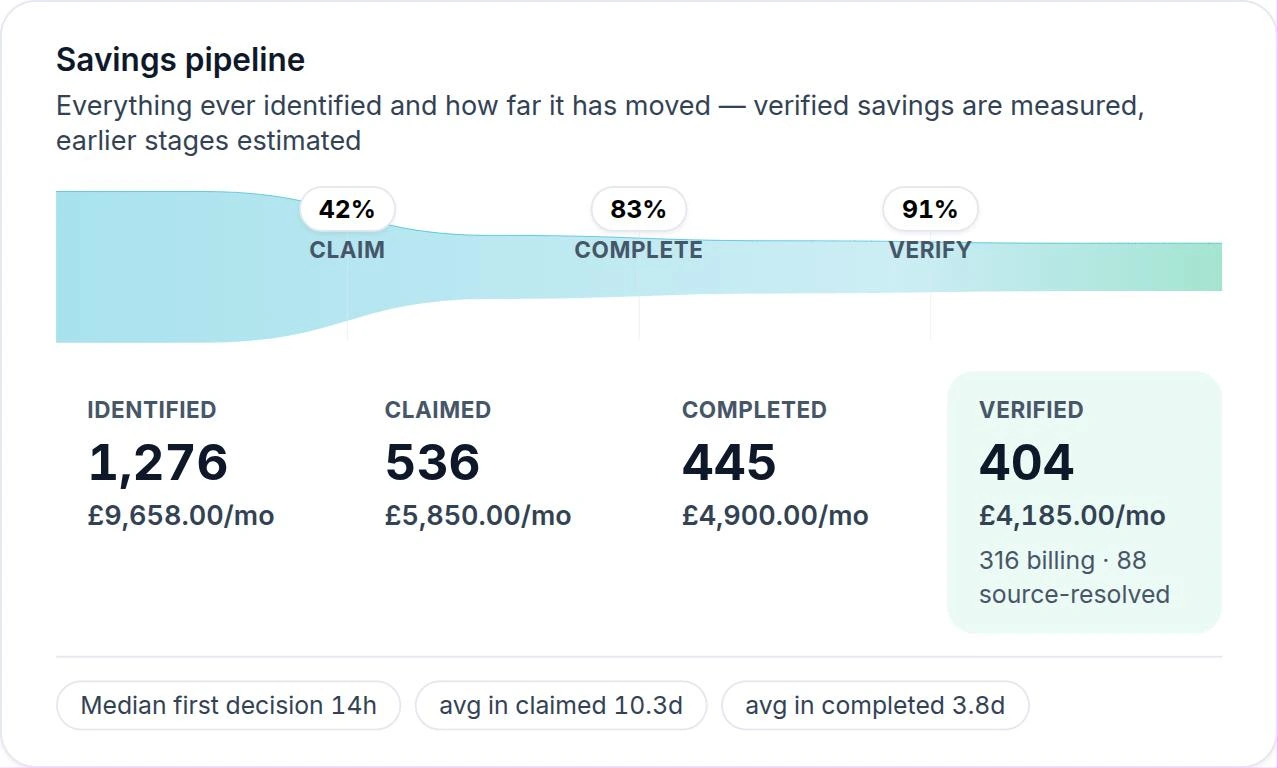
Most tools report what they think you could save. Emnode moves every opportunity through four states and only counts the last one, so the figure you take into a board meeting is the figure that actually left your bill.
Identified
Found and priced against your current bill. Nothing has happened yet, and the number is still an estimate.
Claimed
Someone has put their name to it. It sits on a person's list with an age against it, so it can't quietly expire.
Completed
The change has been made, and Emnode starts watching the daily billing data to see whether spend actually drops.
Verified
Three days of confirmed saving in the billing data. Emnode keeps watching, so anything that creeps back gets picked up.
Ownership
A name against every saving, and what it was worth.
Every closed recommendation with the person who owned it, how long it took and the monthly value — verified against the bill rather than estimated. This is the difference between a FinOps report and a FinOps practice.
Read-only access · Connect AWS or Azure in minutes · No card needed until the trial ends
When something changes
Unexpected spend reaches someone before month-end.
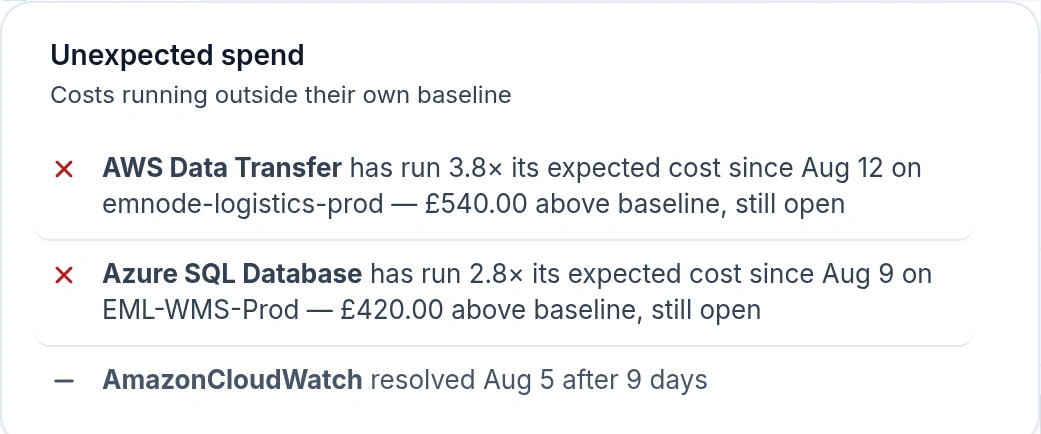
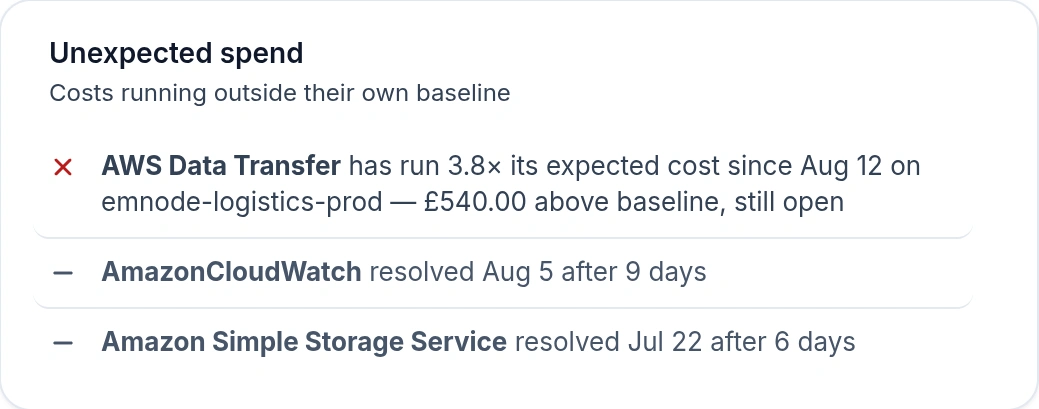
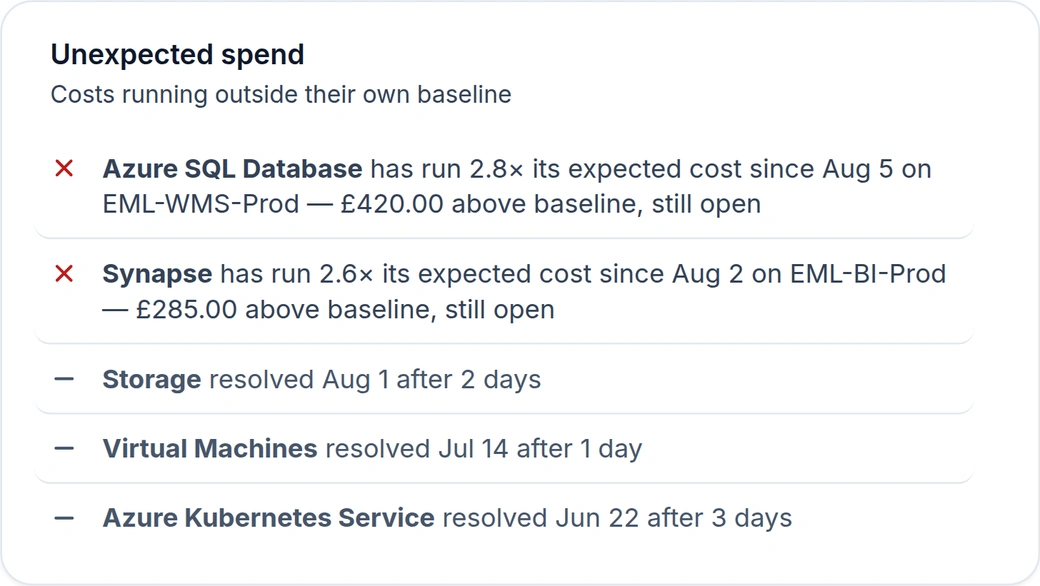
Anomaly detection watches daily cost against each account's normal range and raises what doesn't fit — by email, in the daily digest or as an individual alert — while there is still a month left to act on it.
What a review actually looks like
The monthly cloud cost review, without preparing for it.
Most teams know they should look at cloud spend monthly and don't, because somebody has to pull the numbers together first. Emnode arrives with the agenda already written from your own data, which leaves the meeting as about an hour of decisions.
What changed
Last month against forecast, by account and service, with the movements that actually mattered called out.
What got done
Savings closed since the last review, who closed them, and what the bill says they were worth.
What's stuck
Opportunities with an owner and no movement, ranked by what the delay is costing you each month.
What's next
The highest-value opportunities still unclaimed, ready to have names put against them before everyone leaves.
Built for the whole team
One platform, whatever your role.
For finance
Budgets, forecasts and verified savings. Cloud spend explained in financial terms, with an audit trail of what was actioned.
For engineering teams
Ranked, practical actions with the technical detail to execute: no vague "optimise your instances" advice.
For operations
One workflow for cost, compliance, reliability and monitoring actions — all from the same read-only connection — with progress reporting that writes itself.
FinOps, answered.
What is FinOps?
FinOps is the practice of managing cloud spend as a team sport between finance, engineering and whoever runs your infrastructure. In practice it means three things: knowing what you are spending and why, putting a name against each thing worth fixing, and checking afterwards that the bill actually went down. It is a way of working rather than a piece of software, which is why most of the difficulty is organisational rather than technical.
Do we need a dedicated FinOps team to use Emnode?
No — that is the case Emnode is built for. It automates the jobs a practitioner would do by hand, so existing engineering and finance people run the process in a few hours a month rather than as a full-time role.
Do we need a FinOps certification to run this?
No. Certifications exist and are useful if you intend to build a formal practice, but nothing on this page requires one. Emnode is designed so the judgement calls left to you are ordinary engineering and budget decisions — whether to right-size an instance, whether a saving is worth the change window — rather than anything that needs specialist FinOps training.
What actually happens in a monthly cloud cost review?
Four things: what changed in the bill since last month, which savings were closed and what they were worth, which ones have an owner but no movement, and which unclaimed opportunities to pick up next. The reason most teams skip it is that someone has to assemble all four first.
How do you prove a cloud saving actually happened?
By watching the daily billing data rather than trusting the estimate. Emnode compares daily spend against what it was before the change, and once three days of the saving are confirmed the opportunity is marked verified — then it keeps checking, because a right-sized instance can be scaled back up and a deleted resource can be recreated.
How do you get finance and engineering to agree on cloud costs?
Usually by giving them one artefact instead of two. Finance works in budgets, forecasts and variance; engineering works in instances, services and accounts. Emnode holds both against the same underlying data, so a conversation about a budget overrun can be traced down to the services that caused it, and an engineering change can be reported back as a figure finance recognises. The shared object is the savings list, because both sides can agree on what it is worth and who is doing it.
Do we need to tag everything before we start?
No. Good tagging makes cost allocation more precise and is worth doing eventually, but it is a common reason teams stall before they have saved anything. Emnode works from billing and usage data at the account, service and resource level, so you get a ranked list of what to fix on day one whether or not your tags are tidy. Improve allocation later, once the process is running.
What does a FinOps platform do?
It centralises cloud cost data, surfaces savings opportunities, tracks anomalies and gives each stakeholder the view they need: budgets and forecasts for finance, ranked technical actions for engineering, progress reporting for leadership. Emnode adds the layer most platforms leave out — ownership and verification — so a recommendation has a name against it and a proved outcome rather than an estimate.
How is Emnode different from other FinOps tools?
Two ways. Most tools stop at visibility: they show you the bill and leave the follow-through to you, which is also what AWS Cost Explorer and Azure Cost Management already do for free. Emnode is built around what happens after the finding — an owner, a status, a monthly review and a saving verified against the bill. And it assumes you have no FinOps practitioner, so the process runs on a schedule rather than on somebody remembering.
What access does Emnode need?
Read-only. Emnode does not modify your infrastructure. It reads your billing, usage, compliance, backup and monitoring data, then recommends. You decide and act.
Which clouds does Emnode support?
AWS and Azure, in one platform. Connect either or both with secure read-only access in minutes each. See the AWS and Azure pages for cloud-specific detail.
What happens when the free trial ends?
You trial the plan you pick for 14 days, with no card needed until it ends. If you don't subscribe, your account drops to the Free tier — an open-ended high-level view across cost, compliance, reliability and monitoring — and you can upgrade whenever you're ready. No surprise charges, and you can disconnect your cloud accounts at any time.
Replace spreadsheets with a FinOps process that runs itself.
Connect AWS or Azure in minutes. Turn cloud insights into measurable, tracked savings. Free for 14 days, no card to start.
From £79/month, unlimited users and unlimited cloud accounts. Free tier available. See full pricing →
AWS & Azure · 14-day free trial · No card needed until the trial ends